Upload
Files chosen from a picker or dropped onto a target, with a list of what is uploading, what succeeded and what failed.
Anotomy
Structure of the upload and how its internal parts are composed. These are its semantic parts, so they are also what the
classNames and styles objects accept.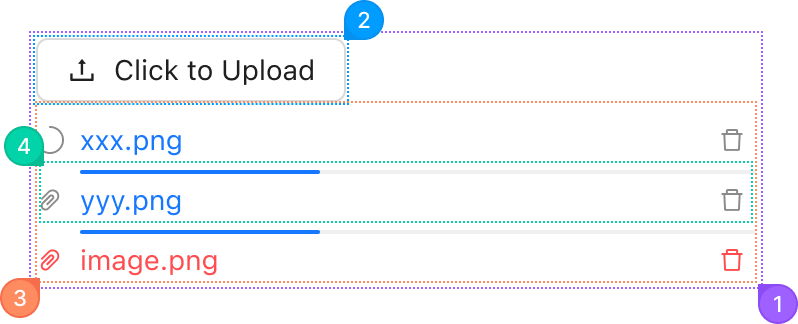
| Name | Description | |
|---|---|---|
1 | root | The whole upload: the trigger and the file list. |
2 | trigger | The area that opens the file picker, the upload's children. Usually a button, or a drop zone with Upload.Dragger. |
3 | list | The list of files, from fileList. listType lays it out as text rows, pictures or cards, and showUploadList={false} hides it. |
4 | item | One file: its icon, name, progress and actions. itemRender replaces it. |
© 2026 AntUIKit . All rights reserved.