Transfer
Two lists and the buttons between them, for moving items from a source set into a selected one.
Anotomy
Structure of the transfer and how its internal parts are composed. These are its semantic parts, so they are also what the
classNames and styles objects accept.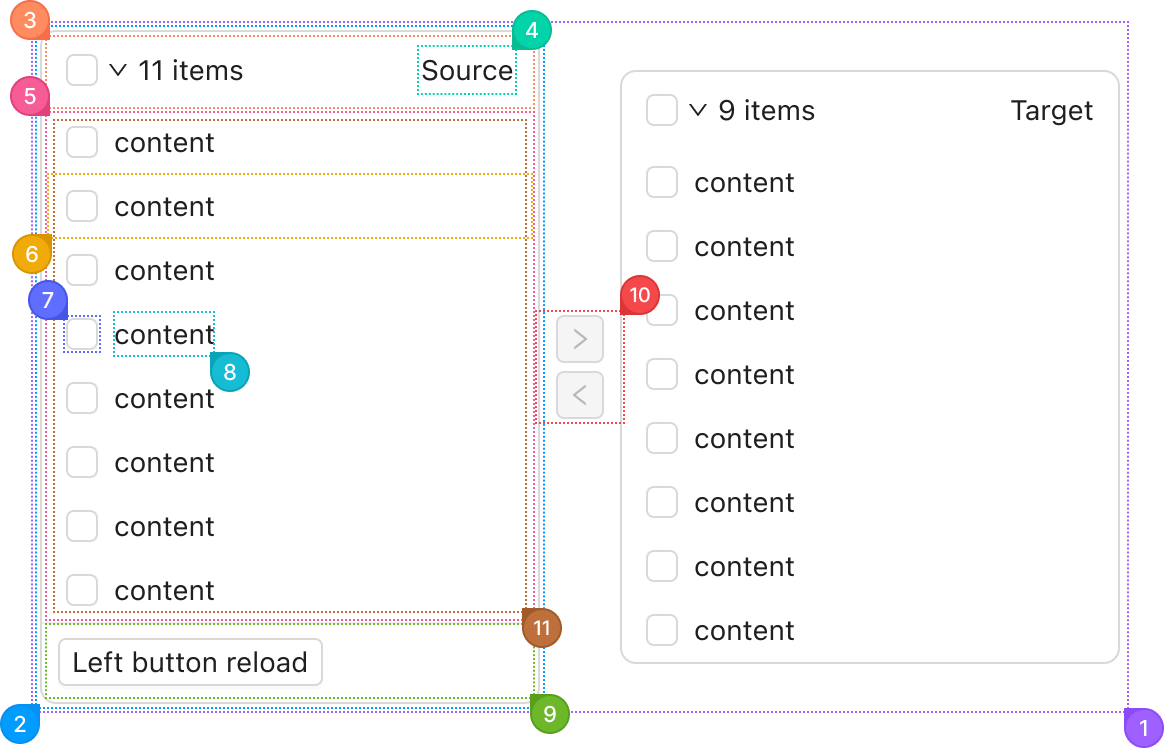
| Name | Description | |
|---|---|---|
1 | root | The whole transfer: both panels and the buttons between them. |
2 | section | One panel, the source on the left or the target on the right. |
3 | header | The panel's top row: the select-all checkbox, the count and the title. |
4 | title | The panel's name, from titles. |
5 | body | The area under the header that holds the search box, when showSearch is set, and the list. |
6 | item | One row, from an entry in dataSource. |
7 | itemIcon | The row's checkbox. |
8 | itemContent | The row's text, from render. |
9 | footer | The row under the list, from footer. |
10 | actions | The buttons that move the checked rows across. actions replaces them, and oneWay leaves only the one that moves right. |
11 | list | The scrolling list of rows inside the body. |
© 2026 AntUIKit . All rights reserved.