Tour
A guided walk through an interface: a mask with a hole in it over one element at a time, and a card explaining what it is.
Anotomy
Structure of the tour and how its internal parts are composed. These are the tour's semantic parts, so they are also what the
classNames and styles objects accept.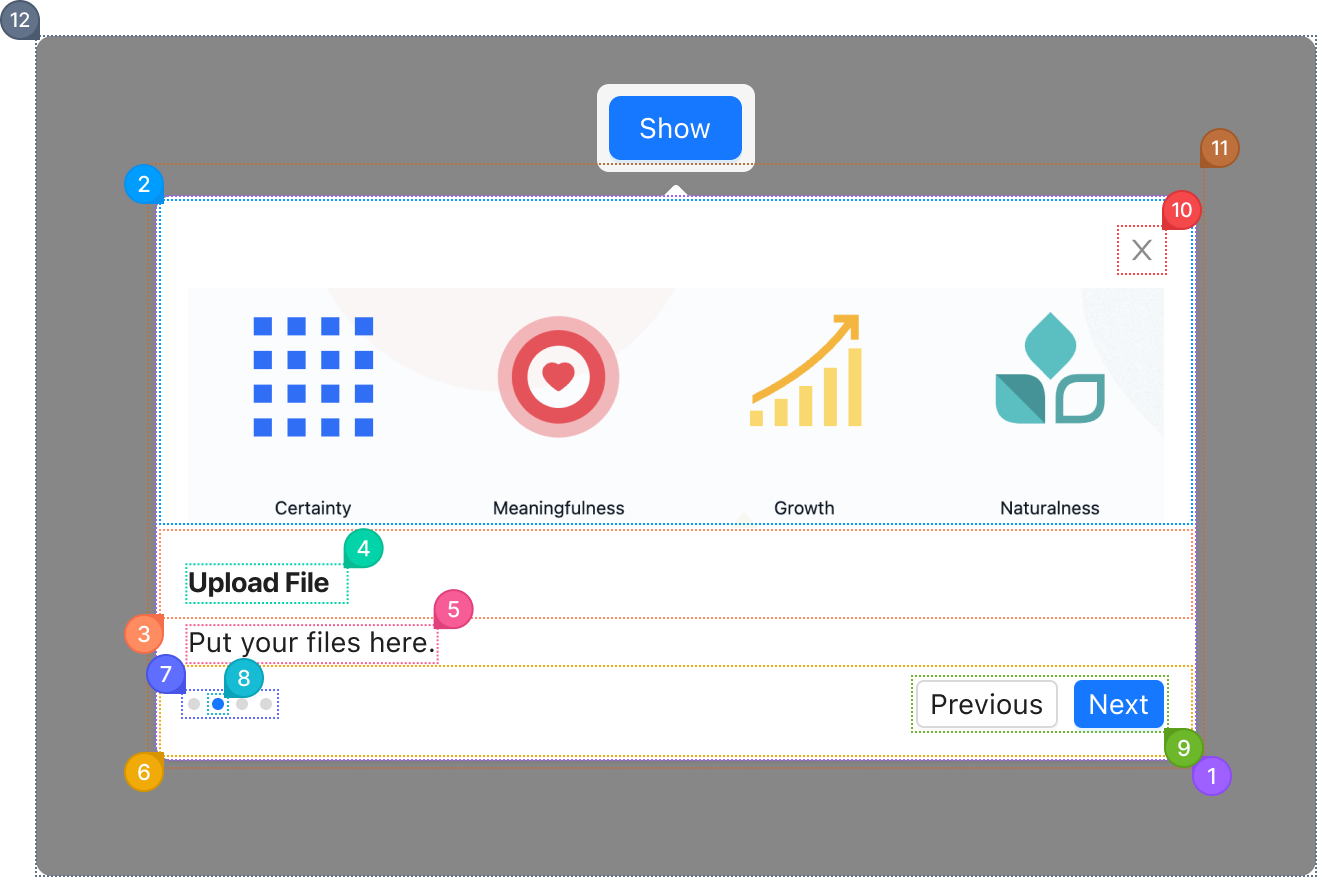
| Name | Description | |
|---|---|---|
1 | section | The step's panel: background, radius, shadow and padding. type="primary" fills it with the brand color. |
2 | cover | The image or node above the title, from the step's cover. |
3 | header | The row holding the title. |
4 | title | The step's heading, from its title. |
5 | description | The step's text, from its description. |
6 | footer | The row at the bottom with the indicators and the buttons. |
7 | indicators | The dots that show where the reader is among the steps. indicatorsRender replaces them. |
8 | indicator | One dot. The one for current is highlighted. |
9 | actions | The Previous and Next buttons, Finish on the last step. actionsRender replaces them. |
10 | close | The close button in the corner. closeIcon replaces the glyph. |
11 | root | The positioned layer around the panel and its arrow, placed by placement next to the step's target. |
12 | mask | The dimmed layer over the page with a cut-out around the target. mask changes or turns it off. |
© 2026 AntUIKit . All rights reserved.