TimePicker
A time of day or a range of them, chosen from scrolling columns or typed into the field.
Anotomy
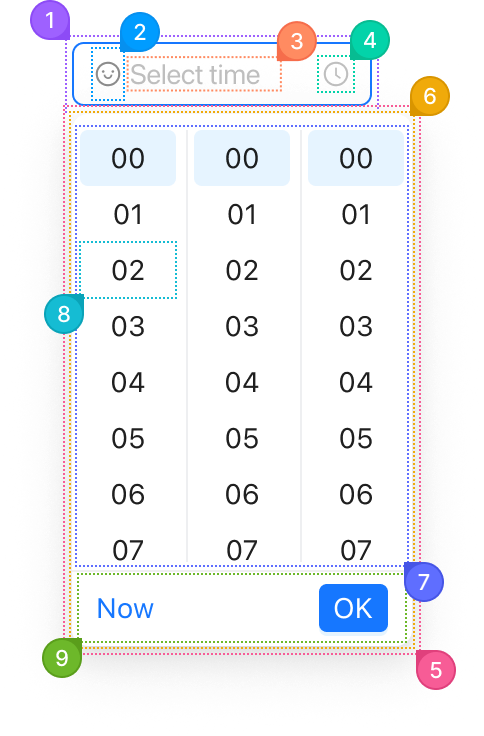
Structure of the time picker and how its internal parts are composed. These are its semantic parts, so they are also what the
classNames and styles objects accept. The panel's parts go in a nested popup object.TimePicker
| Name | Description | |
|---|---|---|
1 | root | The field's box: border, background, radius and padding. variant, size and status change it here. |
2 | prefix | The node from prefix, before the time. |
3 | input | The text field showing the time in format, or the placeholder while empty. |
4 | suffix | The clock glyph at the end. suffixIcon replaces it. |
5 | popup.root | The positioned layer around the panel. It is portalled to <body>, so these keys are how you reach it. |
6 | popup.container | The panel itself: background, radius and shadow. |
7 | popup.content | The scrolling columns, one per unit in format: hours, minutes and seconds by default. |
8 | popup.item | One time cell in a column. |
9 | popup.footer | The row with Now and OK. showNow and needConfirm control them, and renderExtraFooter adds a row above. |
TimePicker.RangePicker
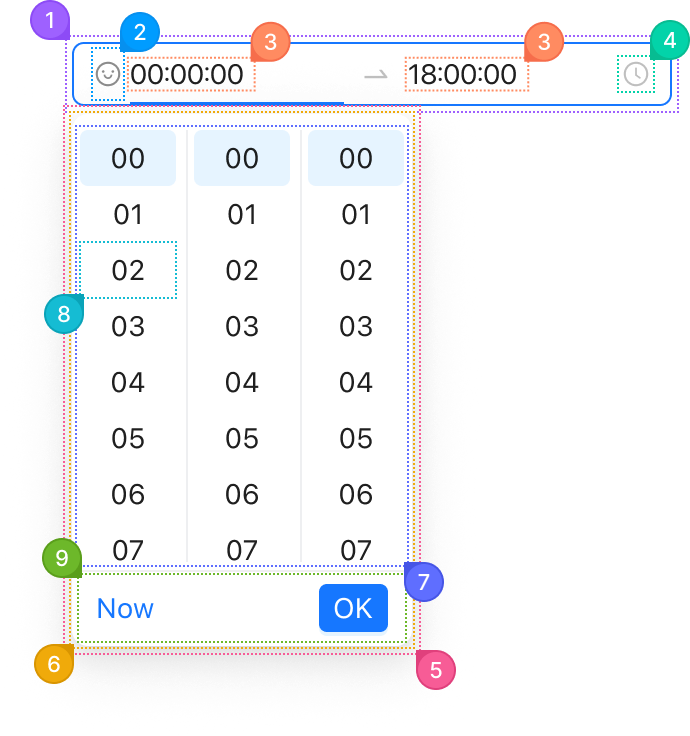
The range picker takes the same keys. It has two inputs and one panel.
| Name | Description | |
|---|---|---|
1 | root | The field's box, holding both inputs and the arrow between them. |
2 | prefix | The node from prefix, before the start time. |
3 | input | Each of the two text fields. The one being edited has the bar under it. |
4 | suffix | The clock glyph at the end. |
5 | popup.root | The positioned layer around the panel. |
6 | popup.container | The panel. It opens under the input being edited and picks that end's time. |
7 | popup.content | The scrolling columns. |
8 | popup.item | One time cell. |
9 | popup.footer | The row with Now and OK. OK moves on to the other end. |
© 2026 AntUIKit . All rights reserved.