Tabs
One panel at a time out of several, each with its own heading. Different content per tab, which is what separates it from a Segmented.
Anotomy
Structure of the tabs and how their internal parts are composed. These are their semantic parts, so they are also what the
classNames and styles objects accept. The image shows type="editable-card" with more tabs than fit, so the overflow menu is open.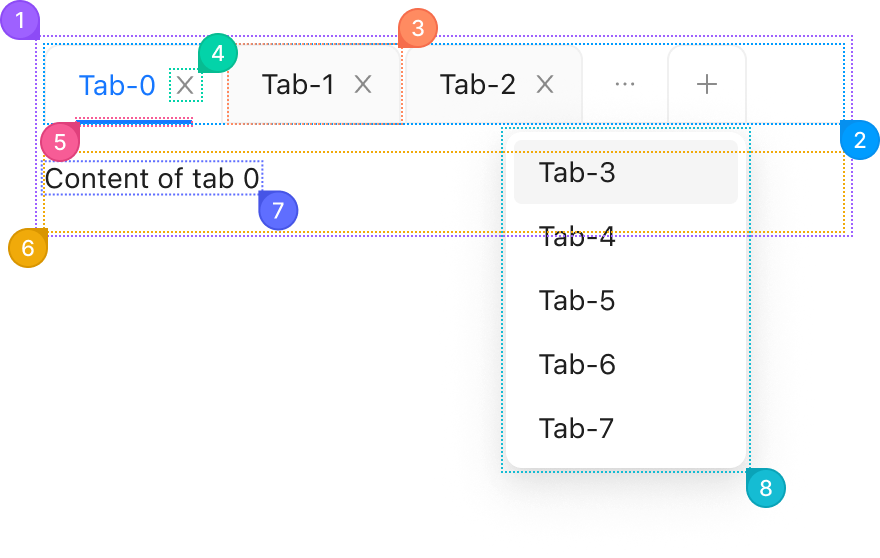
| Name | Description | |
|---|---|---|
1 | root | The whole tabs element: the tab bar and the panels. tabPlacement moves the bar to any side. |
2 | header | The tab bar, a role="tablist" nav. tabBarExtraContent adds nodes at either end of it. |
3 | item | One tab, from an entry in items: its label and an optional icon. |
4 | remove | The close button on a tab in type="editable-card". closable: false on an item hides it, and onEdit runs on its click. |
5 | indicator | The bar under the active tab, which slides when the tab changes. indicator sets its size and alignment. A card tab hides it by default. |
6 | body | The holder around every panel. |
7 | content | One panel, the active item's children. Hidden panels stay mounted unless destroyOnHidden is set. |
8 | popup.root | The overflow menu behind the "..." button, listing the tabs that do not fit. It renders outside the tabs. |
© 2026 AntUIKit . All rights reserved.