Switch
An on or off setting that takes effect right away. Use a Checkbox when the change waits for a Save button.
Anotomy
Structure of the switch and how its internal parts are composed. These are the switch's semantic parts, so they are also what the
classNames and styles objects accept. The image shows a checked switch with checkedChildren="ON".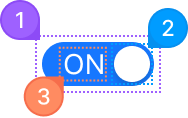
| Name | Description | |
|---|---|---|
1 | root | The track: one <button role="switch"> with the background, the radius and the size. Its color changes with checked. |
2 | indicator | The knob that slides across the track. It is drawn by the part's ::before, so style it with a before: class. |
3 | content | The text or icon inside the track, from checkedChildren and unCheckedChildren. It sits on the side the knob is not on. |
© 2026 AntUIKit . All rights reserved.