Steps
Where the reader is in a sequence, and what is left. Horizontal, vertical, inline or as navigation, with a status per step.
Anotomy
Structure of the steps and how their internal parts are composed. These are their semantic parts, so they are also what the
classNames and styles objects accept. Each item also takes its own classNames and styles for one step, keyed root, wrapper, icon, header, title, subtitle, section, content and rail.Default
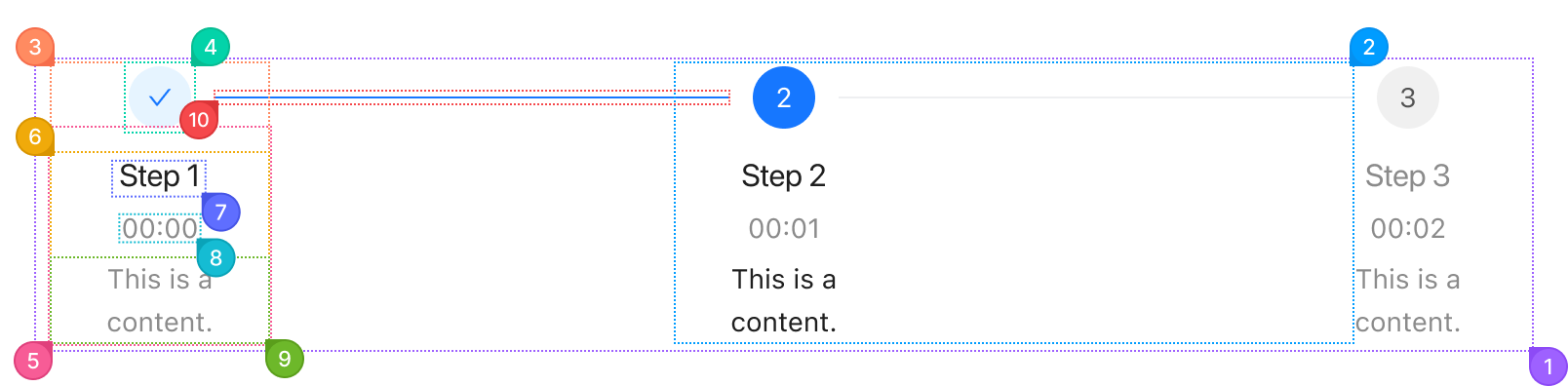
| Name | Description | |
|---|---|---|
1 | root | The row (or column) of steps. orientation turns it vertical, and type switches to the navigation, inline or panel style. |
2 | item | One step, from an entry in items. Its status (wait, process, finish, error) follows current. |
3 | itemWrapper | The block inside a step that holds the icon and the section. |
4 | itemIcon | The circle with the step number, a check once finished. The item's icon replaces it. |
5 | itemSection | Everything beside or under the icon: the header and the content. |
6 | itemHeader | The block holding the title and the subtitle. titlePlacement="vertical" puts it under the icon. |
7 | itemTitle | The step's name, from the item's title. |
8 | itemSubtitle | The quieter text with the title, from the item's subTitle. |
9 | itemContent | The text under the header, from the item's content. |
10 | itemRail | The line to the next step. It takes the color of the step it leads to, and the last step has none. |
Panel
With type="panel", each step is a colored panel with an arrow into the next one.

| Name | Description | |
|---|---|---|
1 | root | The row of panels. |
2 | item | One panel, with an arrow into the next one. Its color follows the step's status. |
3 | itemWrapper | The block inside a panel. |
4 | itemSection | The header and the content. |
5 | itemHeader | The row with the title and the subtitle. |
6 | itemTitle | The step's name. |
7 | itemSubtitle | The quieter text beside the title. |
8 | itemContent | The text under the header. |
© 2026 AntUIKit . All rights reserved.