Skeleton
The shape of the content before the content arrives, so the layout does not move when it does.
Anotomy
Structure of the skeleton and how its internal parts are composed. These are its semantic parts, so they are also what the
classNames and styles objects accept.Skeleton
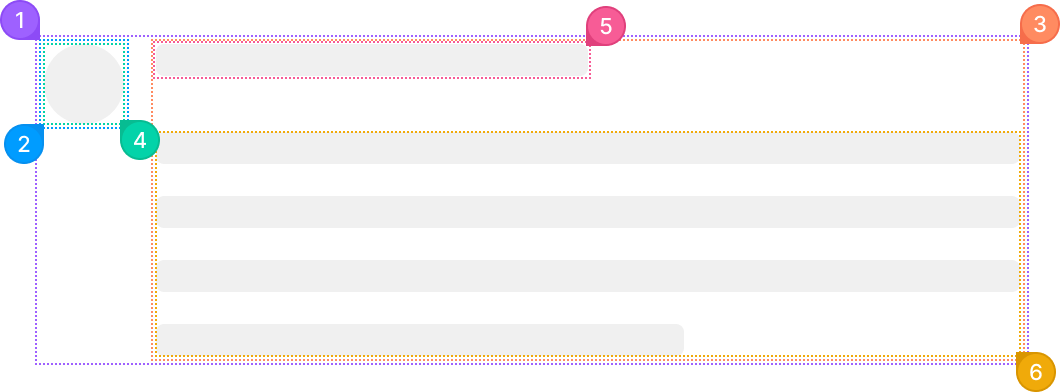
| Name | Description | |
|---|---|---|
1 | root | The whole placeholder. active runs the shimmer across every part. |
2 | header | The column holding the avatar. It renders when avatar is set. |
3 | section | The column holding the title and the paragraph. |
4 | avatar | The round or square block from avatar. |
5 | title | The first bar, from title. Its default width changes with the avatar and the paragraph. |
6 | paragraph | The lines under the title. paragraph.rows sets how many, and the last one is shorter. |
Elements
From the left: Skeleton.Avatar, Skeleton.Button, Skeleton.Input, Skeleton.Image and Skeleton.Node. Each takes the same two keys.
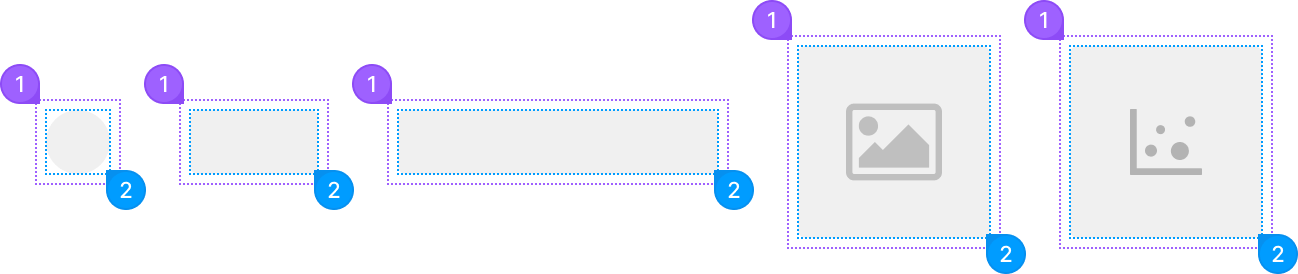
| Name | Description | |
|---|---|---|
1 | root | The wrapper around one element. |
2 | content | The gray shape itself. Size it through classNames.content or style. |
© 2026 AntUIKit . All rights reserved.