Notification
A corner panel with a title, a body and its own actions, for something that happened which the reader did not ask about.
Anotomy
Structure of a notification and how its internal parts are composed. These are its semantic parts, so they are also what the
classNames and styles objects accept.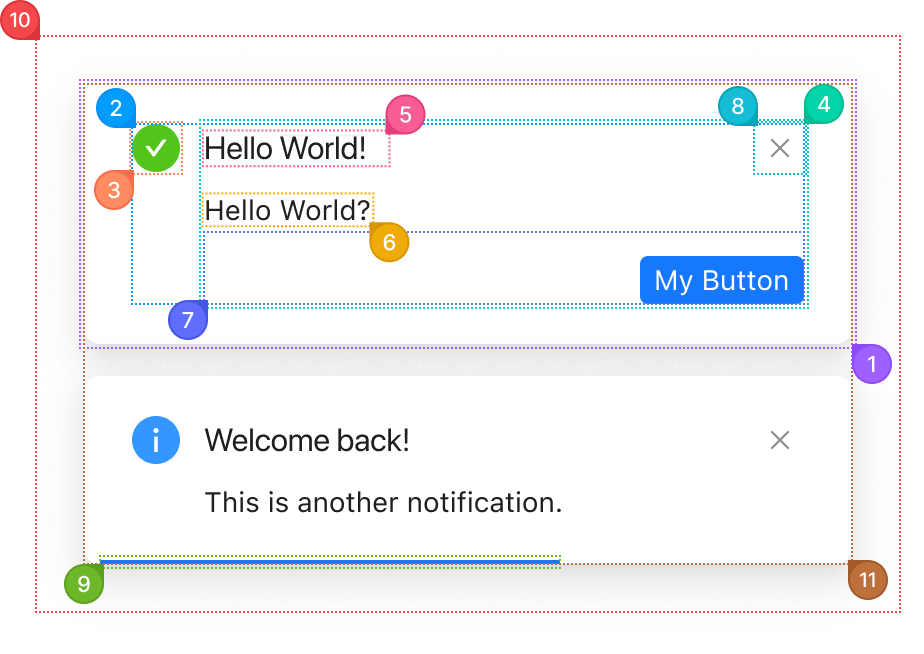
| Name | Description | |
|---|---|---|
1 | root | One notification card: background, padding, radius and shadow. |
2 | wrapper | The area inside the card that holds the icon and the text. |
3 | icon | The status glyph on a typed call (success, error, info, warning). icon replaces it. |
4 | section | The column holding the title and the description. |
5 | title | The first line, from title. |
6 | description | The text under the title, from description. |
7 | actions | The buttons under the text, from actions. They do not close the card on their own. |
8 | close | The close button in the corner, drawn when closable is set. closeIcon replaces the glyph. |
9 | progress | The bar along the bottom that counts down duration. It only renders when showProgress is set. |
10 | list | The fixed layer in a corner of the page that stacks every open notification. placement picks the corner. |
11 | listContent | The column inside the list that spaces the cards and animates their height. |
© 2026 AntUIKit . All rights reserved.