Modal
A dialog that takes the page's attention until it is answered, plus the static confirm, info, success, error and warning calls.
Anotomy
Structure of the modal and how its internal parts are composed. These are the modal's semantic parts, so they are also what the
classNames and styles objects accept. The dialog renders in a portal, so these keys are how you reach it.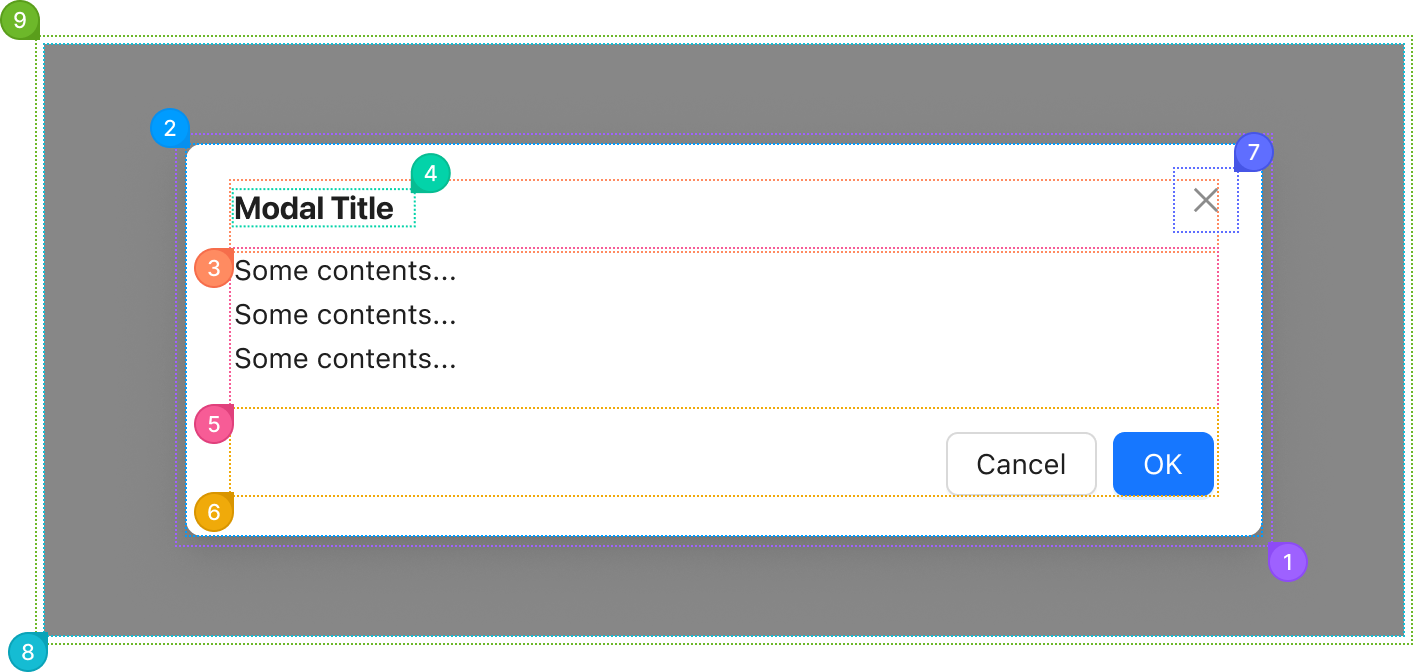
| Name | Description | |
|---|---|---|
1 | root | The dialog's outer box. width and centered place it here. |
2 | container | The panel itself: background, radius, shadow and padding. |
3 | header | The row holding the title. It renders when title is set. |
4 | title | The heading, from title. It also names the dialog for screen readers. |
5 | body | The dialog's children. Give styles.body a maxHeight to scroll the body instead of the page. |
6 | footer | The button row, from footer. Cancel and OK by default, and footer={null} removes it. |
7 | close | The close button in the corner, drawn when closable is set. closeIcon replaces the glyph. |
8 | mask | The dimmed layer over the page, behind the dialog. mask changes or turns it off. |
9 | wrapper | The full-screen layer that positions and scrolls the dialog. A click on it closes the dialog when mask.closable allows it. |
© 2026 AntUIKit . All rights reserved.