Anotomy
Structure of the menu and how its internal parts are composed. These are the menu's semantic parts, so they are also what the
classNames and styles objects accept. The keys for entries inside a submenu go in a nested subMenu object.Horizontal
With mode="horizontal", group headings and the list key have no effect.
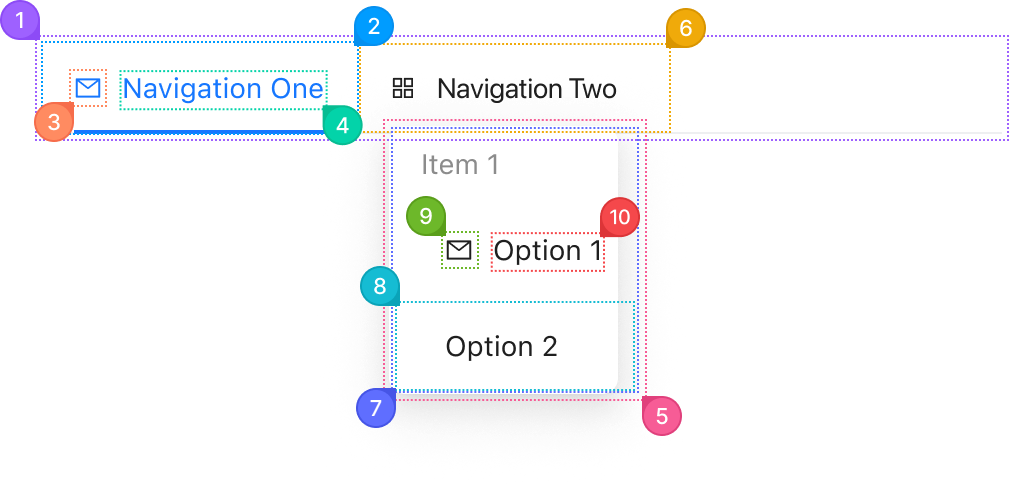
| Name | Description | |
|---|---|---|
1 | root | The whole menu. mode makes it a horizontal bar, a vertical list with flyouts, or an inline tree. |
2 | item | One entry, from items. The ones in selectedKeys carry the selected style. |
3 | itemIcon | The node from the item's icon, before the label. |
4 | itemContent | The item's label, from its label. |
5 | popup | The flyout a submenu opens. It renders in a portal, so this key is how you reach it. |
6 | subMenu.itemTitle | The row of an item with children, the one that opens its submenu. |
7 | subMenu.list | The list of entries inside a submenu. |
8 | subMenu.item | One entry inside a submenu. |
9 | subMenu.itemIcon | A submenu entry's icon. |
10 | subMenu.itemContent | A submenu entry's label. |
Vertical
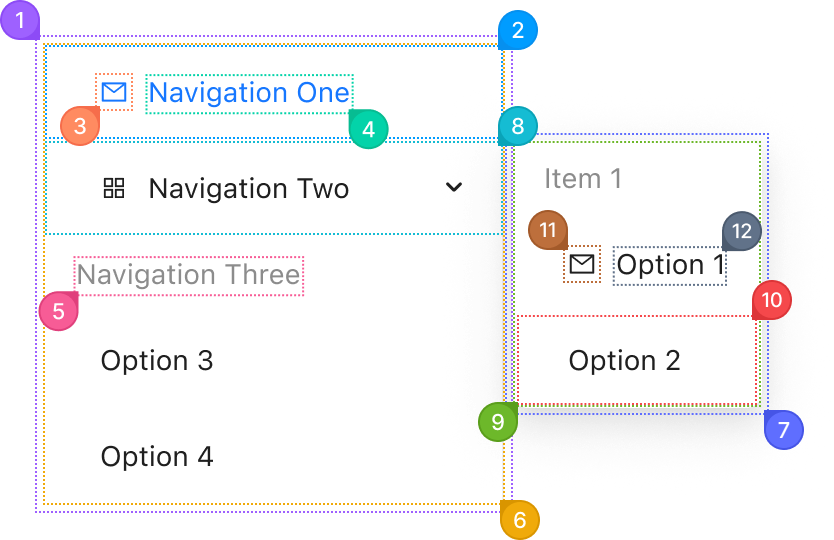
| Name | Description | |
|---|---|---|
1 | root | The whole menu. |
2 | item | One entry, from items. |
3 | itemIcon | The node from the item's icon. |
4 | itemContent | The item's label. |
5 | itemTitle | The heading of an item with type: "group". |
6 | list | The list element that holds the top-level entries. |
7 | popup | The flyout beside the submenu's row. |
8 | subMenu.itemTitle | The row that opens the submenu. |
9 | subMenu.list | The list of entries inside the flyout. |
10 | subMenu.item | One entry inside the submenu. |
11 | subMenu.itemIcon | A submenu entry's icon. |
12 | subMenu.itemContent | A submenu entry's label. |
Inline
With mode="inline", a submenu opens in place, so there is no popup.
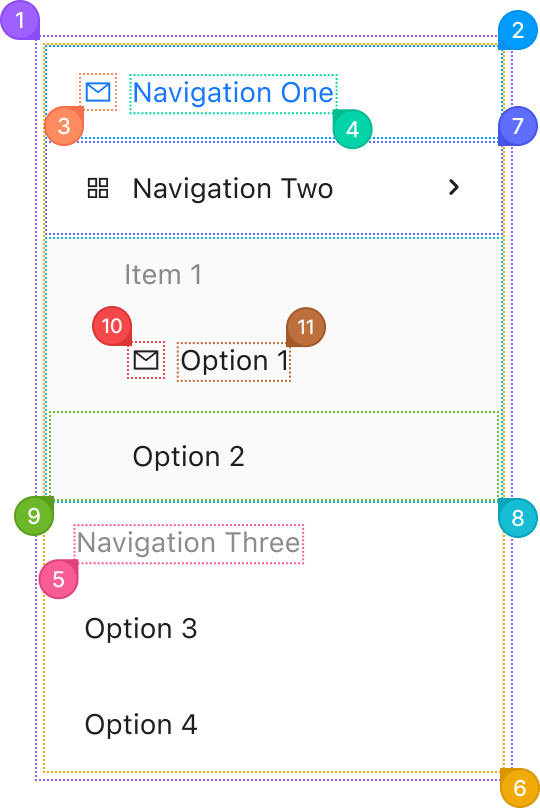
| Name | Description | |
|---|---|---|
1 | root | The whole menu. |
2 | item | One entry, from items. |
3 | itemIcon | The node from the item's icon. |
4 | itemContent | The item's label. |
5 | itemTitle | The heading of an item with type: "group". |
6 | list | The list element that holds the top-level entries. |
7 | subMenu.itemTitle | The row that opens the submenu. Its arrow turns when the submenu opens. |
8 | subMenu.list | The indented list under the row, on a tinted background. |
9 | subMenu.item | One entry inside the submenu. |
10 | subMenu.itemIcon | A submenu entry's icon. |
11 | subMenu.itemContent | A submenu entry's label. |
© 2026 AntUIKit . All rights reserved.