InputNumber
A field for a number, like a price, a count or a percentage, with a range, a precision and stepper buttons.
Anotomy
Structure of the number input and how its internal parts are composed, in both modes. These are its semantic parts, so they are also what the
classNames and styles objects accept.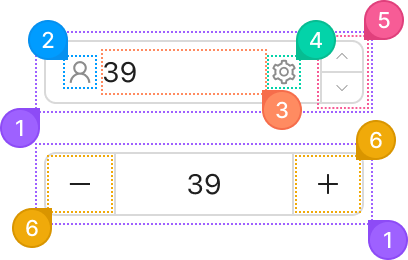
| Name | Description | |
|---|---|---|
1 | root | The field's box: border, background, radius and padding. variant, size and status change it here. |
2 | prefix | The node from prefix, before the number. Usually an icon or a currency sign. |
3 | input | The real <input>, which takes the free width. |
4 | suffix | The node from suffix, after the number. |
5 | actions | The column holding the up and down buttons. It only exists in mode="input", and controls={false} removes it. |
6 | action | One step button: up or down in the default mode, minus or plus in mode="spinner". Each press moves the value by step. |
© 2026 AntUIKit . All rights reserved.