Anotomy
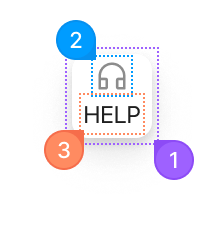
Structure of the float button and how its internal parts are composed. These are its semantic parts, so they are also what the
classNames and styles objects accept. The badge and tooltip are separate components with their own parts.FloatButton
| Name | Description | |
|---|---|---|
1 | root | The floating button, fixed to the corner of the page. shape makes it a circle or a square, and type fills it with the brand color. |
2 | icon | The node from icon. |
3 | content | The text under the icon, from content. It only fits a square button. |
FloatButton.Group
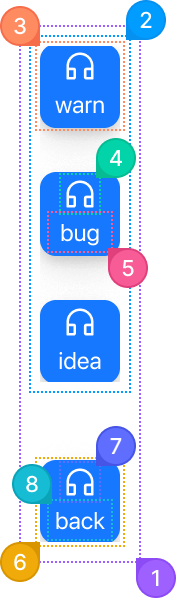
The group takes its own classNames, keyed by these eight parts.
| Name | Description | |
|---|---|---|
1 | root | The whole group, fixed to the corner of the page. |
2 | list | The stack of buttons. With trigger it opens and closes as a menu. |
3 | item | One button in the stack. |
4 | itemIcon | An item's icon. |
5 | itemContent | An item's text. |
6 | trigger | The button that opens the menu, when trigger is set. |
7 | triggerIcon | The trigger's icon. closeIcon replaces it while the menu is open. |
8 | triggerContent | The trigger's text. |
© 2026 AntUIKit . All rights reserved.