Drawer
A panel that slides in from an edge and keeps the page behind it visible, for work that is a detour rather than a new destination.
Anotomy
Structure of the drawer and how its internal parts are composed. These are the drawer's semantic parts, so they are also what the
classNames and styles objects accept. The drawer renders in a portal, so these keys are how you reach it.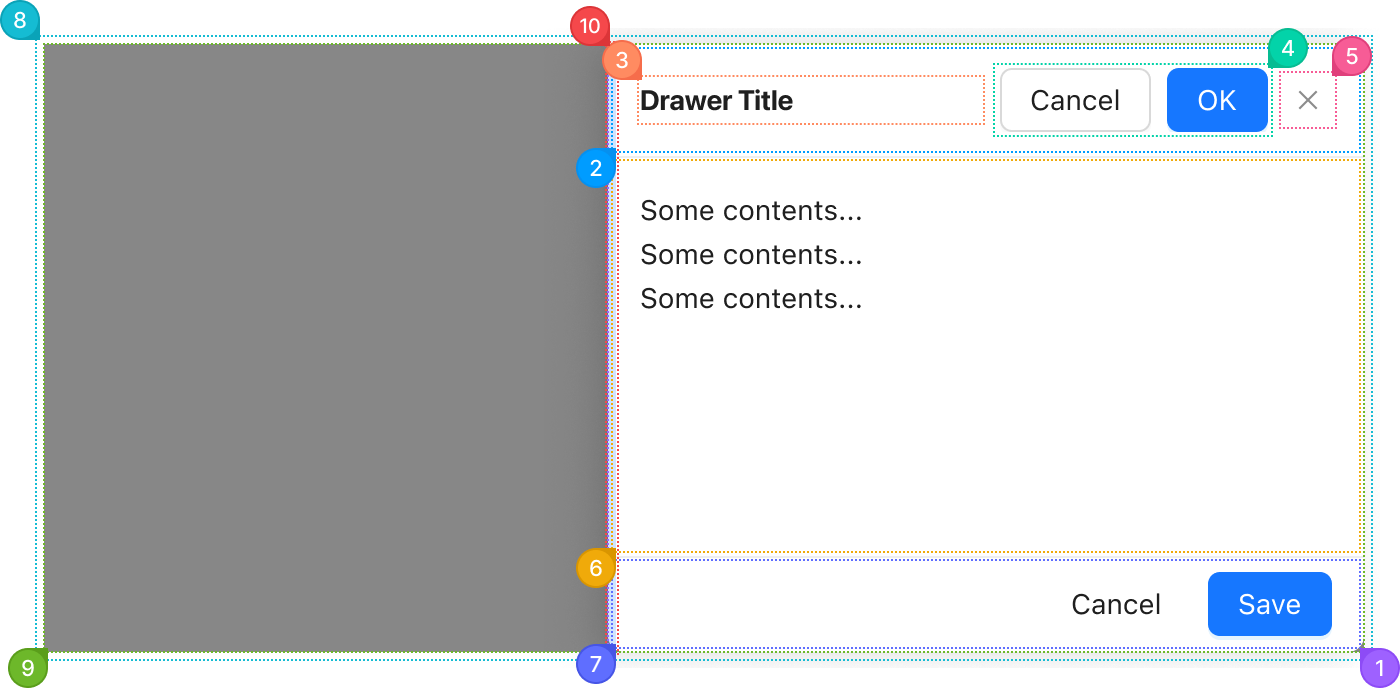
| Name | Description | |
|---|---|---|
1 | section | The panel that slides in: background, size and shadow. placement and size set it here. |
2 | header | The row holding the title, the extra and the close button. |
3 | title | The heading, from title. It takes the free width. |
4 | extra | Controls at the end of the header, from extra. Usually the panel's main actions. |
5 | close | The close button, drawn when closable is set. |
6 | body | The drawer's children, in the scrolling area between the header and the footer. |
7 | footer | The row at the bottom, from footer. It only renders when footer is set. |
8 | root | The fixed layer over the whole page that holds the mask and the panel. |
9 | mask | The dimmed layer over the page, behind the panel. mask changes or turns it off. |
10 | dragger | The strip on the panel's inner edge that resizes it, when resizable is set. It takes the brand color while you hover it. |
© 2026 AntUIKit . All rights reserved.