Collapse
Content folded behind its own heading, one panel or several, with an accordion mode that keeps one panel open at a time.
Anotomy
Structure of the collapse and how its internal parts are composed. These are the collapse's semantic parts, so they are also what the
classNames and styles objects accept. A single item takes the same keys, except root.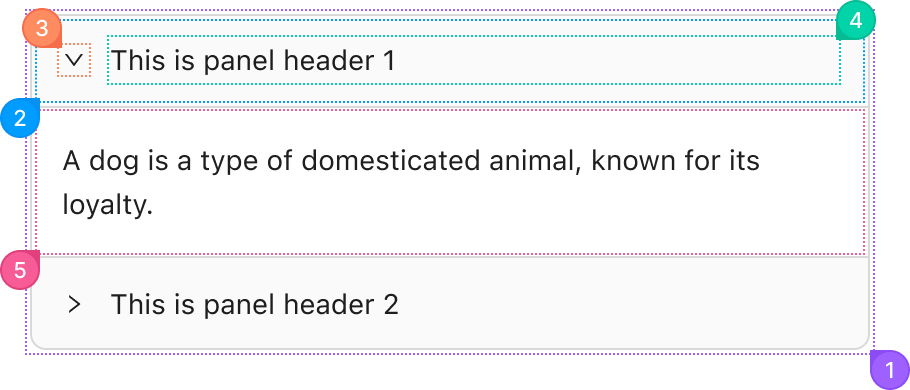
| Name | Description | |
|---|---|---|
1 | root | The box around every panel: border, radius and background. bordered and ghost change it here. |
2 | header | One panel's clickable row, from the item's label. It toggles the panel, and an extra node sits at its end. |
3 | icon | The expand arrow. It rotates when the panel opens, expandIcon replaces it, and expandIconPlacement moves it to the end. |
4 | title | The header's text, which takes the free width. |
5 | body | The panel's content, from the item's children. It renders the first time the panel opens, unless forceRender is set. |
© 2026 AntUIKit . All rights reserved.