Checkbox
Zero or more choices out of a set, each independent. The indeterminate state is a parent's summary of its children, not a third value.
Anotomy
Structure of the checkbox and how its internal parts are composed. These are the checkbox's semantic parts, so they are also what the
classNames and styles objects accept.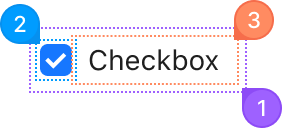
| Name | Description | |
|---|---|---|
1 | root | The <label> around the box and the text, so a click anywhere on it toggles the checkbox. className lands here. |
2 | icon | The box itself, holding the real <input type="checkbox">. It draws the check mark when checked and a dash when indeterminate. |
3 | label | The text you pass as children, with the gap to the box. It only renders when there are children. |
© 2026 AntUIKit . All rights reserved.