Cascader
A select for a value that lives in a tree: each column narrows the next, and the value is the path rather than a single leaf.
Anotomy
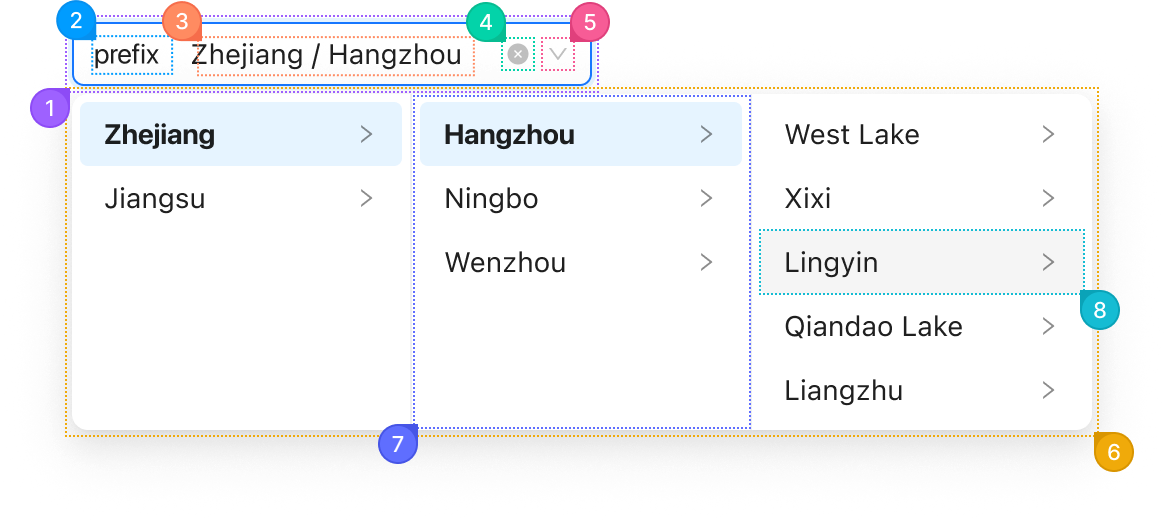
Structure of the cascader and how its internal parts are composed. These are its semantic parts, so they are also what the
classNames and styles objects accept. The popup's parts go in a nested popup object.Single
| Name | Description | |
|---|---|---|
1 | root | The field's box: border, background, radius and padding. variant, size and status change it here. |
2 | prefix | The node from prefix, before the selection. |
3 | content | The area that holds the chosen path. displayRender changes how the path reads. |
4 | clear | The button that empties the field, shown on hover when allowClear is set. |
5 | suffix | The arrow at the end. suffixIcon replaces it. |
6 | popup.root | The dropdown panel. It is portalled to <body>, so these keys are how you reach it. |
7 | popup.list | One column of the panel, one per level of options. Choosing an option opens the next column. |
8 | popup.listItem | One option in a column. expandTrigger="hover" opens its children on hover instead of click. |
Multiple
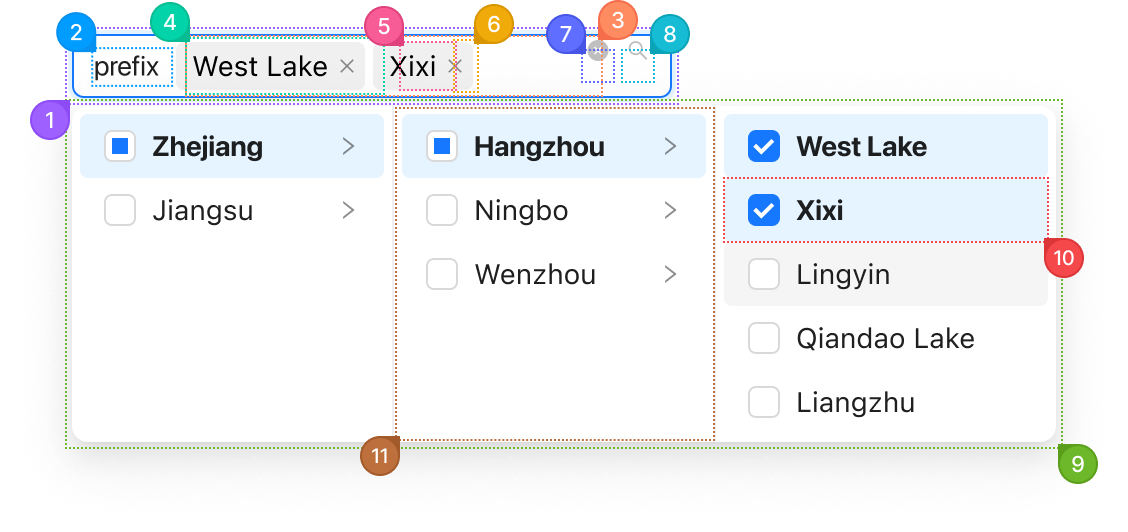
With multiple set, each chosen path becomes a tag with its own three parts.
| Name | Description | |
|---|---|---|
1 | root | The field's box. It grows in height when the tags wrap. |
2 | prefix | The node from prefix, before the tags. |
3 | content | The area that holds the tags and the search input. |
4 | item | One tag for a chosen path. maxTagCount folds the rest into a "+N" tag. |
5 | itemContent | A tag's label, the last label of the path. |
6 | itemRemove | A tag's remove button. removeIcon replaces the glyph. |
7 | clear | The button that removes every tag, shown on hover when allowClear is set. |
8 | suffix | The arrow at the end, or a search glyph while the popup is open. |
9 | popup.root | The dropdown panel. Each option gets a checkbox, and a parent shows a partial check when only some of its children are chosen. |
10 | popup.listItem | One option in a column. |
11 | popup.list | One column of the panel. |
© 2026 AntUIKit . All rights reserved.